







Facial recognition in security systems: How they work and what they could contribute to the security posture

Data Scientist

Senior Data Scientist

Senior Data Science Manager
Data Scientist
Senior Data Scientist
Senior Data Science Manager
Data Scientist
Senior Data Scientist
Senior Data Science Manager
Authentication plays a central role in boosting an organization’s security posture. It helps enable an organization to keep its systems secure by permitting only authenticated users (or processes) to access the protected resources, such as computer systems, networks, databases, websites and other network-based applications or services.
Passwords are the more traditional form of authentication, but they constitute a weak form of protection; users are prone to bad password practices, such as reusing passwords, using predictable passwords, or even sharing passwords with others. To combat this issue, more companies are leveraging artificial intelligence (AI) and machine learning (ML) technologies, such as deep learning-based techniques, to develop better and more secure authentication approaches. AI/ML algorithms have been shown to bolster cybersecurity by protecting devices against cyber-attacks and preventing fraudulent activities. In this blog post, we introduce an AI solution based on deep learning and computer vision to perform face recognition based biometrical authentication.
What is face recognition?
Face recognition technology is not new – you are probably already using it in your daily life. Most of us use smart phones nowadays, which often employ face recognition technology to unlock the device. This technology provides a powerful way to protect personal data and ensure that even if the phone is stolen, sensitive data remains inaccessible by the perpetrator. The use of face recognition technology is being applied to an ever-expanding set of domains, including safety, security, and payments.
So, what exactly does face recognition do? Face recognition is a broad problem of identifying or verifying a person in digital images or video frames through the facial biometric pattern and data. The technology collects a set of unique biometric data of each person associated with their face and facial expression to authenticate a person. Face recognition technology is mostly used for two types of tasks:
- Face Verification: given a face image, match it with known images in secure database, give a yes/no decision (for example, is this the person who claims he/she is?). Does the person exist in the database?
- Face Identification: given a face image, match it with known images in secure database, detect whose image it is (for example, who is this person?). Identifying the person such as the image is John Doe’s or Mark Twain’s, and so on.
End-to-end face recognition system for biometrical authentication
Ericsson’s Global Artificial Intelligence Accelerator (GAIA) team has been working on a Proof of Concept that aims to make the authentication more secure. While there are other companies in the market that offer commercial products or services to help build face recognition applications, the GAIA team mostly leveraged open-source tools to build an AI-powered solution that can be used on mobile or edge devices. With the resource constraints (limited storage and memory on a device, for example), it is critical to find a good balance among the model complexity, performance and response time when selecting the best candidate AI models. One more important factor that needs to be considered is trustworthiness of AI models for face recognition. Ericsson developed guidelines for trustworthy AI development to support these initiatives.
Figure 1 shows the architectural design of the end-to-end face recognition system for biometrical authentication. It takes a reasonably small number of images or video frames as the input, detects human faces, and determines if the human faces match any of the face images in the database of enrolled users. If a match is determined the person is biometrically verified, otherwise they are not verified. The system consists of four basic modules: face detection, face alignment, face encoding, and face matching. In addition, a face liveness check is added as an optional module in the pipeline to ensure the authenticated person is a real person, and the system is not fooled by a photograph of a targeted person.
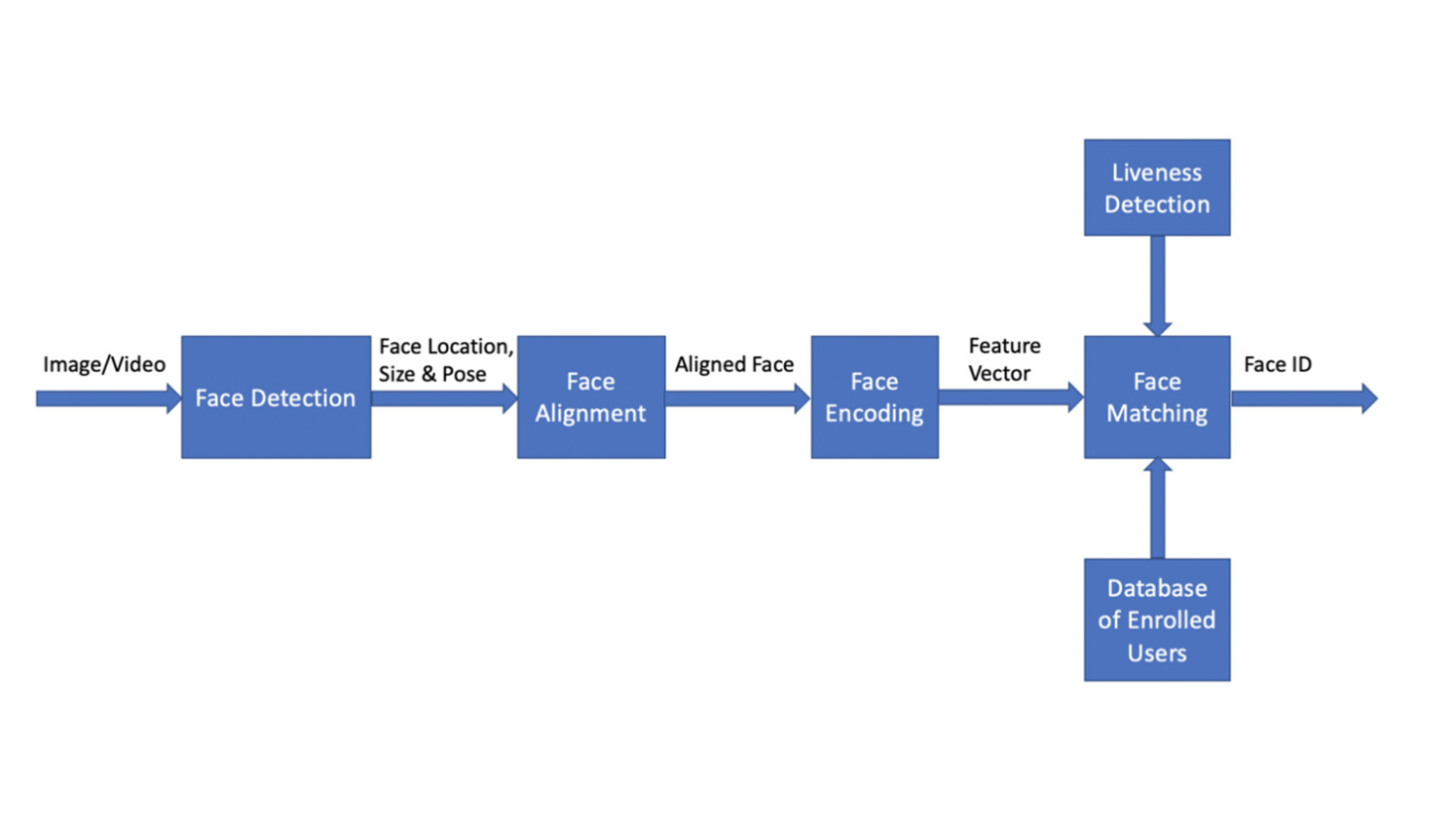
Figure 1: Architecture of end-to-end face recognition system for biometrical authentication
Face detection
Face detection is the first step in the pipeline. It is the process of finding a face in an image. This step only focuses on finding a face and does not concern identity determination. Ultralight detector is set as the default face detection model, as it gives excellent performance in detecting faces from different angles (i.e., it is not restricted by detecting front face only). Furthermore, the detector is a lightweight model (with size <2MB) and can detect faces very fast (with inference time 50 +/- 6 ms on a MacBook Pro 2.6GHz Intel Core i7 with 32GB DDR4).
Face alignment
Face alignment is the next step, after a face is detected in an image. Quite often when a person takes a picture, he or she may not be facing directly towards the camera. However, face alignment can deal with the problem. Even if a face is turned in different directions, the system is still able to tell if it is the same person. More specifically, an algorithm called “face landmark estimation” is applied to locate facial landmarks, i.e., the specific points that exist on every face, such as top of chin, outside edge of each eye, inner edge of each eyebrow, etc.
Figure 2 shows an example of the 68-point face landmark model that is used in the pipeline to locate specific points on every face. Once the locations of those key geometric face structures are identified, any rotation, translation and scale representation of the face can be normalized. No matter how the face is turned, the eyes and mouth can be centered in roughly the same position in the image. With the face aligned, the later step of the face matching process will become more accurate.
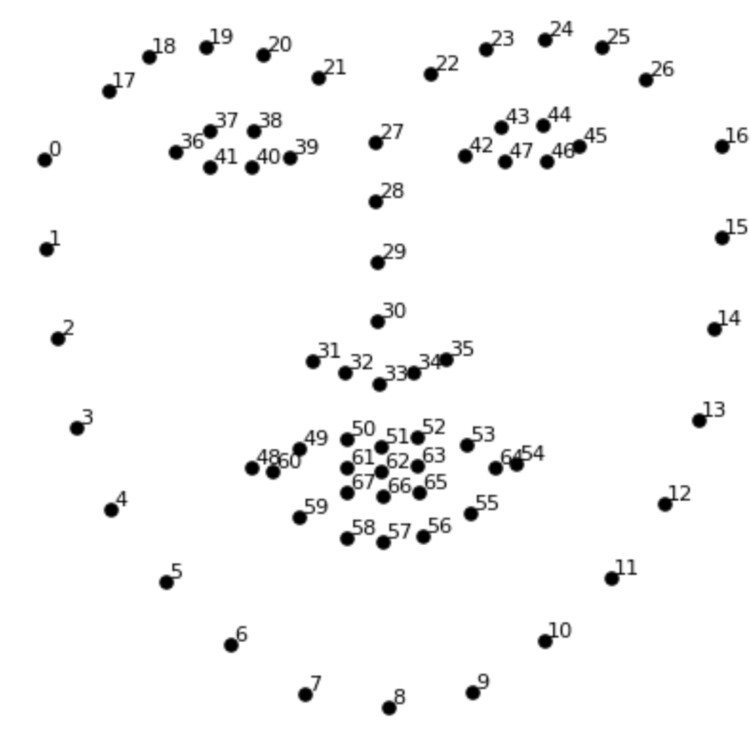
Figure 2: Example of the 68-point face landmark model
Face encoding
The third step is face encoding. This process identifies key parts of a face through the “eyes of a computer.” As computers can only recognize numbers, a reliable way of converting face images to numbers/measurements was needed to represent each face. Finding a good method of face encoding was a challenging task. Quite often deep learning models, such as the “Convolutional Neural Network (CNN)” model, are trained by using a large database of face images to calculate the best face representation of each face. The goal of this training is to generate nearly the same encodings when looking at two different pictures of the same person, whilst generating quite different measurements when looking at pictures of different people.
After exploring many different models, a pre-trained Resnet model provided in Dlib was chosen for the face encoding model of the pipeline. This model was essentially a ResNet-34 model, which was modified by dropping some layers and re-building with 29 convolution layers. This Resnet model takes an image inputs with size 150 x 150 x 3 and represents/encodes each face image as 128-dim measurements. Once the model network was designed, the pretrained model was trained on a dataset of about 3 million faces. The face dataset was mainly derived from the two open-source face databases, the face scrub dataset and the VGG dataset. The design of the ResNet-34 model is shown in Figure 3.
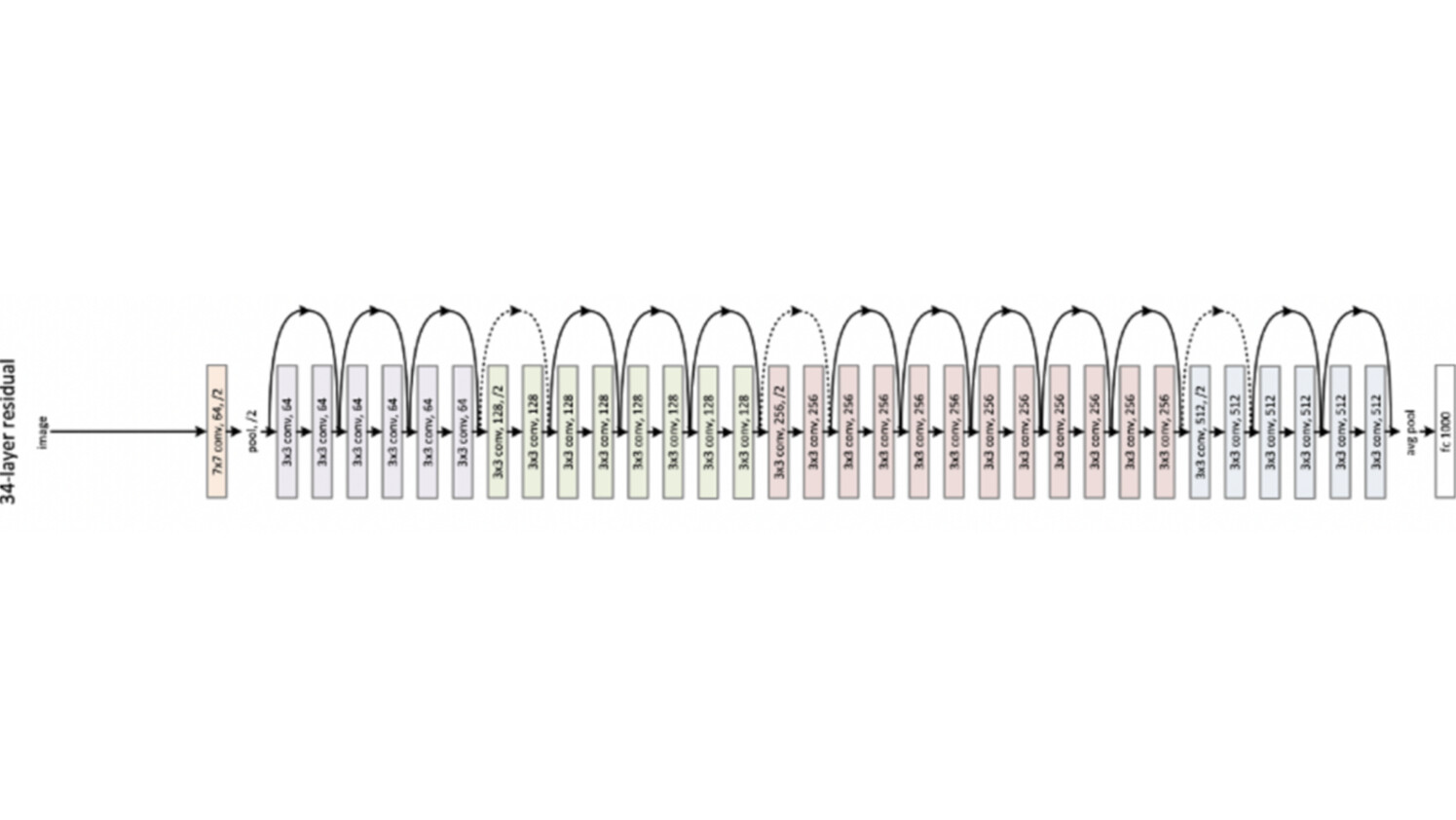
Figure 3: Design of ResNet-34 model
Face matching
After encoding of a face, the final step is to perform face matching. This entails calculating the distance of two encodings/measurements corresponding to two faces and compare the distance against a threshold. If the distance is smaller than the threshold, then the two faces are determined to belong to the same person; otherwise, the two faces are from two different people.
There are two major types of face matching tasks:
Face identification: the process involves finding the person in the database of known enrolled users who has the closest encoding (i.e., smallest distance) to the test face image.
Face verification: compares the encoding of the test face image with the targeted encoding (i.e., encoding of the authorized user). If the two encodings are close enough (i.e., smaller than the threshold), the test person is verified.
Face liveness detection
In addition to the main functionality of the face recognition pipeline, liveness detection has been incorporated into the pipeline. This is an optional feature to make sure the authenticated face is from a real person, not from a photograph or from a video frame. The movement-based models such as “eye-blink detection” and “mouth-moving detection” are used as part of the liveness check. Once the liveness detection feature is triggered, the system detects eye-blinks followed by the mouth close-open-close pattern to verify if it is a live person.
Eye-blink detection:
A real person will unconsciously blink their eyes. The eye-blink detection model tries to detect the eyes’ open-close-open pattern across different frames. Eyes are located by the face alignment step, and then used to calculate the eye aspect ratio. The ratio is further used to predict the open or closed status of eyes using a ML model based on “Support Vector Machine (SVM)”, as the machine-learning model provides more robust detection of eyes’ status compared to a prefix threshold-based approach.
Mouth-moving detection:
Similarly, once the location of a mouth is determined by the face alignment step, the mouth aspect ratio is calculated to determine the open or closed status of mouth. Since a mouth is less sensitive than eyes, a fixed threshold is good enough to make the decision. The mouth is classified as open if the mouth aspect ratio is larger than a threshold.
Results
The system takes about 120Mb space to hold all the models used for the system, including face detection, face alignment, face encoding and liveness detection. The average runtime of the system is 9.67 Frames Per Second (FPS). The higher the FPS, the better animation quality and with 7~8 FPS, the resulting animation is quite smooth. The system gives close to perfect accuracy based on our test face images, i.e., the system almost always able to verify an identity correctly.
Future work
We have presented how our face recognition solution, including face identification works. The achieved performance shows that our approach is effective and feasible even for mobile applications. Further work will focus on increasing accuracy while maintaining compactness (memory usage and processing speed), integration into applications including mobile applications, and lifecycle management.
Acknowledgements
We would like to thank Goran Coster, Luigi Luliano, Jim Reno, Tom Vo, Taesuh Park, Satish Kumar Kolli, and Xiaolin Cheng for providing ample and essential support to this project. We thank Zeljka Lemaster, Marios Daoutis and Heidi Wahl for proofreading and revision suggestions.
Read more
Read about Ericsson Telecom Security Products and Solutions
Read more The how and why of AI: enabling the intelligent network
Read more AI in networks