







How to manage massive number of firmware updates in NB-IoT networks

System Architect, Business Area Cloud Software and Services
System Architect, Business Area Cloud Software and Services
System Architect, Business Area Cloud Software and Services
There is one thing common in all Internet of Things (IoT) applications: the firmware of IoT devices needs to be updated occasionally or regularly. Such updates introduce new IoT application features, apply security patches, or optimize the performance of IoT devices. Many of us take such updates for granted, without being aware that over-the-air (OTA) IoT updates may easily prove to be the most difficult use case in NB-IoT cellular networks if the number of the target IoT devices becomes high. As the NB-IoT networks were designed for the infrequent transmission of tiny amounts of data, this data-heavy use case may turn out to be the bottleneck according to the calculations on how many devices an NB-IoT cell can serve.
The main findings and the technical details of this article come from lab tests, traffic modelling and study activities of the Ericsson Massive IoT Program. We used the lab setup depicted in Figure 1 for the NB-IoT OTA update tests.
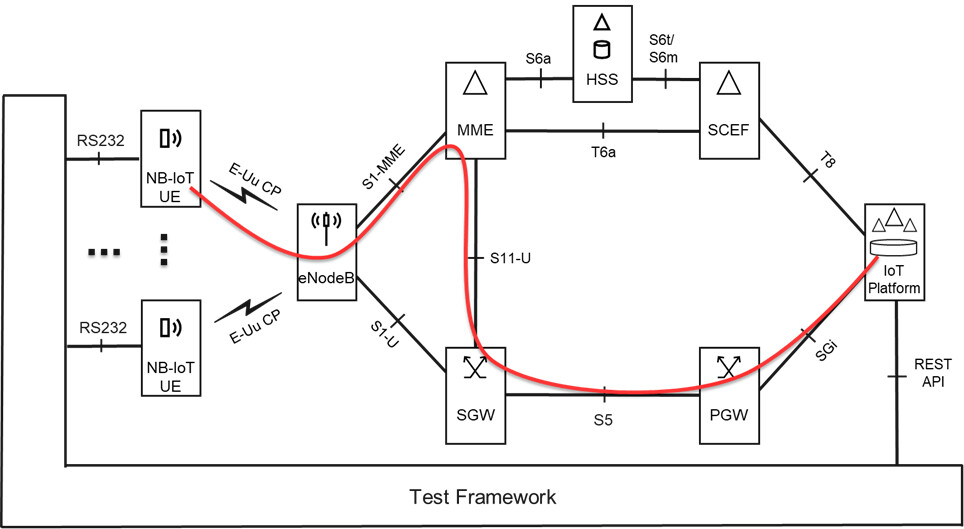
Figure 1: Lab setup of firmware update over-the-air tests
The NB-IoT devices are in the same cell and configured and monitored by the test framework via RS232 interface. They communicate with the servers of the IoT platform via the so-called Data over NAS (DoNAS) path of the 4G cellular network – as illustrated by the red line in Figure 1. The IoT platform hosts various servers. The following ones are relevant from our point of view.
- IoT OTA Update application server hosting the IoT OTA Update control processes. The update process initiates a mobile terminated session with the target NB-IoT user equipment (UE) and controls the UE during the firmware (FW) download procedure using the LwM2M/CoAP protocol. The control processes are triggered and monitored by the test framework via REpresentational State Transfer (REST) Application Programming Interfaces (API). The LwM2M Firmware Update procedure relies on a pair of interacting functions in the client device and the server application. Both include a state-event machine and communicate periodically to keep the states coordinated.
- File server storing the firmware files and providing an HTTP interface via which the devices can download the FW using an appropriate HTTP GET command. In general, firmware files can be downloaded to the devices using different protocols like FTP, HTTP or CoAP. The HTTP/TCP stack has been applied for that purpose in our lab.
The challenges of the IoT OTA Update use case are outlined below and then you can find a few tips and tricks on how to manage copious amounts of concurrent FW updates in an NB-IoT network.
Challenges of the IoT OTA Update use case
Although the firmware update use case is supported by the 3GPP standards from Release 13, the original estimations calculate with the firmware size of 10-100 KB. In the practice, the FW size of 1 MB is not considered large. Transfer of such a data amount requires long sessions which can easily overlap, resulting in many concurrent sessions. The growing number of parallel downloads reduces the transmission speed, prolongs the sessions, and increases the energy consumption of the devices which shortens the life cycle of the battery operated UEs.
We can achieve a better performance if we keep the number of parallel FW update sessions per cell under a certain threshold. The timespan of the IoT OTA Update campaign shall consider the capacity of the NB-IoT network. The IoT OTA Update campaign is the time interval during which the firmware is delivered to the entire population of the impacted devices. The above requirement tries to prolong the campaign’s length. On the other hand, there may be business demand for time boxing. For example, the devices must be urgently updated with an important security patch. These contradictory requirements set the need for a so called ‘network aware’ delivery of the firmware. It means a ‘smart’ schedule which considers:
- the entire population of the target devices including their UE category
- the capacity of the cells (i.e., deployment mode and number of non-anchor carriers) in the NB-IoT network
- the cell location and the coverage conditions of the devices and
- the utilization of possible free cellular resources like the unused spectrum of the collateral broadband network.
The smart planning of the IoT OTA Update campaign may prove to be difficult in practice if we have a huge device population distributed in a large network. The text below describes a few methods for overcoming this challenge.
- First, we discuss how the communications service provider (CSP) can help the enterprise customers in the design of the IoT OTA Update campaign
- Then we focus on the cell level orchestration of the FW update sessions
- Finally, the network level aspects will be discussed
The proposed method tries to find the shortest time for downloading the FW to all target devices without overloading the cells. The cell capacities, namely the downlink cell throughput capacity and the maximum number of parallel sessions are the most important limiting factors of the FW download.
Note: The ‘maximum number of parallel sessions’ is a configurable parameter in the NB-IoT networks. We assume in the following text, that this parameter is configured properly, and it does not limit the number of parallel FW update sessions.
How the CSP can support the IoT OTA Update campaigns
The CSP can help improve the performance of the firmware update campaigns of the NB-IoT deployments. The proposed method defines the steps below.
- Based on historical traffic information, the CSP informs their customers about the appropriate time periods during which the FW update sessions can be executed. The proposed method creates a concept of these periods and calls them ‘OTA Update Window’. The OTA Update Window can be defined for a certain geographical region, so it may embrace numerous NB-IoT cells. The downlink throughput capacity of the OTA Update Window is also declared by the CSP, thereby the enterprise customer can calculate how many FW update sessions can be executed in parallel and in sequence without risking other use cases.
- The CSP can temporarily extend the capacity of the NB-IoT cells for the time of the OTA Update Windows, for example, by rearranging the available cellular resources of the collateral broadband network. For instance, the dispensable broadband spectrum can be allocated for the dynamically created non-anchor carriers of the NB-IoT cells. Thereby the capacity of the OTA Update Windows can be increased significantly, which may help to fulfill the time boxing requirements of the OTA Update Campaign.
In summary, the OTA Update Window is a concept of a time interval during which the NB-IoT cells of the associated geographical area have a certain free downlink throughput capacity which can be used for downloading the firmware without jeopardizing other IoT use cases.
An example for OTA Update Windows can be found in Figure 2. The windows are valid for every night within the time span of the OTA Update Campaign. The first window starts at 21:00 and ends at 01:00 the next day. The second window is valid between 01:00 and 06:00 at dawn. Both windows have the same base throughput capacity coming from the NB-IoT network, which is 90 kbps in the figure. Thus, without the capacity extensions, a single OTA Update Window could have been defined in the period of 21:00 – 06:00. Since the available cellular resources of the collateral broadband network differ in the periods of 21:00 – 01:00 and the 01:00 – 06:00 in the example, the CSP is entailed to define two OTA Update Windows for maximizing their throughput capacity.
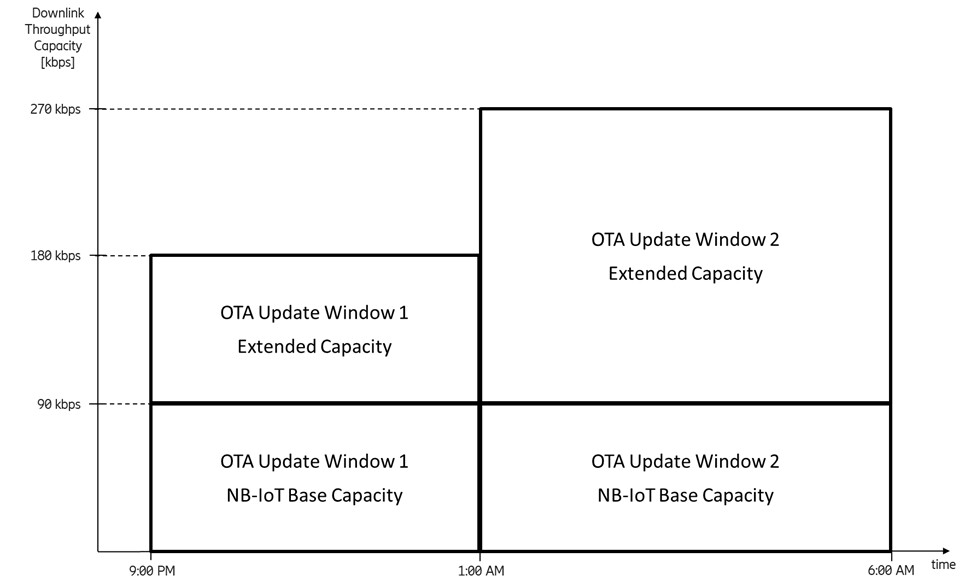
Figure 2: Example for OTA Update Window definition
The CSP is supposed to consider a few rules by defining the OTA Update Windows.
- The definition of an OTA Update Window is based on historical traffic information and points to a future period. The declared throughput capacity of the OTA Update Window relies on a prediction and may contain planned but not secured capacity extensions of the correlated NB-IoT cells. The proposed concept does not include any resource reservation, thus, there is no guaranteed Quality of Service (QoS) associated with the windows. Their capacity should be considered as a promise without a warranty. This shall be clearly communicated to the customers.
- The FW update sessions and the sessions of the background traffic may reach the allowed maximum number of sessions. A new FW update session might not be established in such case. This should be communicated to the customer.
- The periods of the OTA Update Windows must not overlap in any cell of the NB-IoT network. Of course, the OTA Update Windows of separate geographical areas may overlap at any time.
OTA Update Windows offered to different customers should not overlap either. Instead, the proposed method is to distribute the separate OTA Update Windows fairly between the customers having overlapping OTA Update Campaigns.
- The OTA Update Windows shall be double-checked against the policy and the capacity of the entire NB-IoT network. Consequently, the aggregated traffic of the OTA Update Windows should be serviceable by all cellular network entities with a good chance.
Finally, the OTA Update Windows can be offered to the customers. The offer contains their time interval, the associated geographical area and the promised downlink throughput capacity. Since many OTA Update Windows may refer to the same region or cell group, we propose to use the abstract data representation below.
1. Cell Map of OTA Update Windows
It is proposed to declare the list of the geographical areas referred to by the OTA Update Windows. A Cell Map item may consist of
- a unique name of the area which can be referred to by the windows and
- a list of Cell IDs, each of which corresponds to a cell covered by the area
An example of a Cell Map is shown in Figure 3.
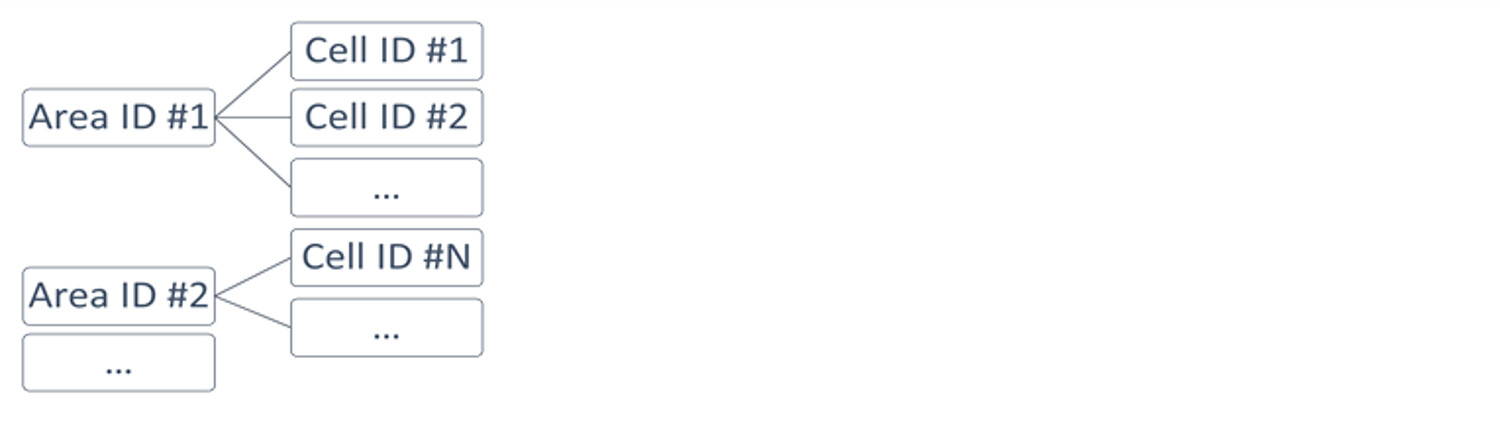
Figure 3: Example for Cell Map
2. List of OTA Update Windows
The recommended structure of this object is shown in Figure 4.
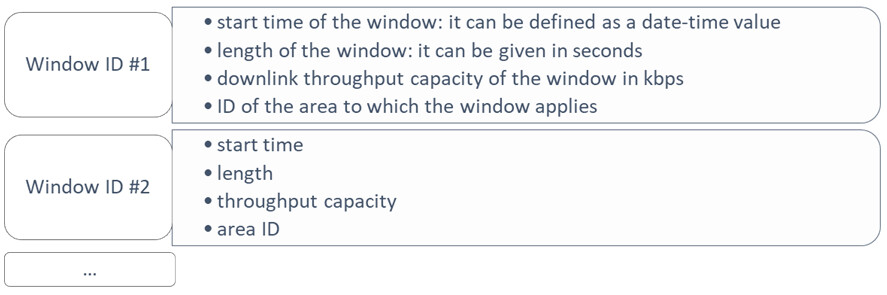
Figure 4: Example for List of OTA Update Windows
The CSP may know the volume of the NB-IoT traffic per region in hourly breakdown. If the volume is remarkable below the network capacity in certain periods of the day (e.g.: in nighttime between 21:00 and 6:00 of the next day), then a specific proportion (e.g.: 85 percent) of the difference can be assigned to OTA Update Windows.
Similar knowledge of the broadband network conditions enables the occasional capacity extension of the NB-IoT cells, for example, by moving a part of the unused spectrum resources from the broadband network to the NB-IoT cells for the periods of the OTA Update Windows.
Cell level planning and orchestration of the FW update sessions
The goal of the below described method is to find the shortest time needed for downloading the firmware to all target devices without overloading the cell.
The throughput capacity of the cells can be utilized to discrepant extents by the devices residing in different coverage conditions. In short, an IoT device dwelling in bad coverage consumes significantly more throughput resource for downloading the same firmware than the same type of device residing in good coverage. This must be considered in the planning of the OTA Update Campaign. This article proposes a simplified method for how the enterprises can calculate the impact of the coverage conditions.
The IoT application server(s) possessed by the enterprise can observe, remember, and regularly update the transmission speed of the IoT devices. This is usually below the nominal transmission speed indicated by the device vendor. The orchestration can take the observed transmission speed in the calculation of the FW update session length and the nominal transmission speed in the anticipation of the cellular throughput consumption of the FW update session. Of course, this method is not accurate but provides a simple and ‘good enough’ estimation as far as the aggregated traffic of the sessions does not exceed the throughput capacity of the OTA Update Window.
The proposed orchestration method uses the concept of a Device Map. The Device Map is a data container comprising the list of target devices and their attributes needed for the execution of the OTA Update Campaign. An illustration of the Device Map is shown in Figure 5. It is recommended to make the data structure searchable for Cell ID to find the devices residing in a cell easily.
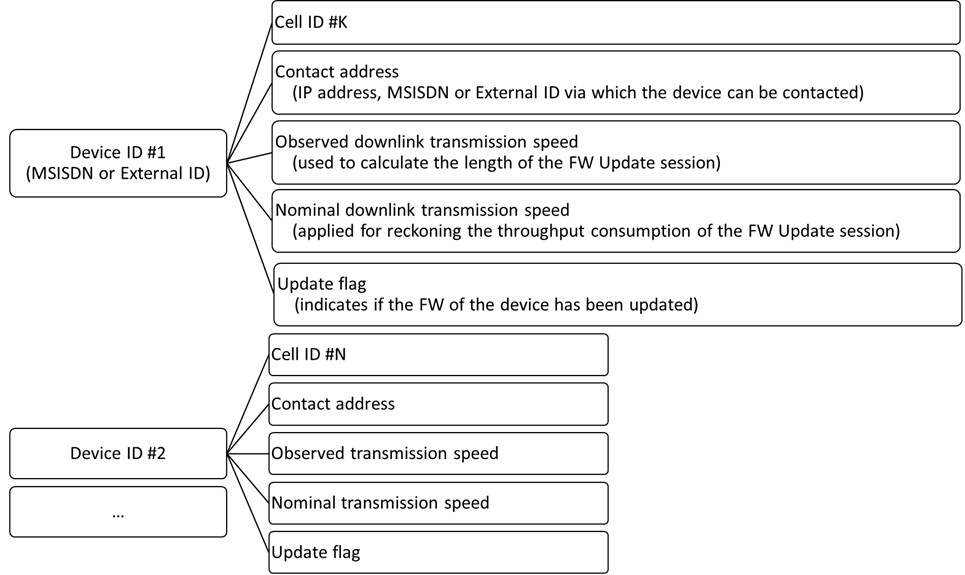
Figure 5: Example for Device Map
Network aware orchestration of the FW update sessions
This section contains a few proposals on how the FW update sessions can be orchestrated in a network aware way. There are a few things that need to be prepared before the first OTA Update Window of the campaign begins.
Preparation of the orchestration
It is assumed in this section, that the IoT OTA Update server performs the preparation steps below. Of course, it can be done in other ways as well.
1. Preparation of OTA Update Window Monitor
The IoT OTA Update server processes the List of OTA Update Windows and the Cell Map and generates a list of date-time values with their correlated OTA Update Windows and cells. An example for an OTA Update Window Monitor is shown in Figure 6. The attribute of ‘throughput consumption of sessions’ is initialized with zero.
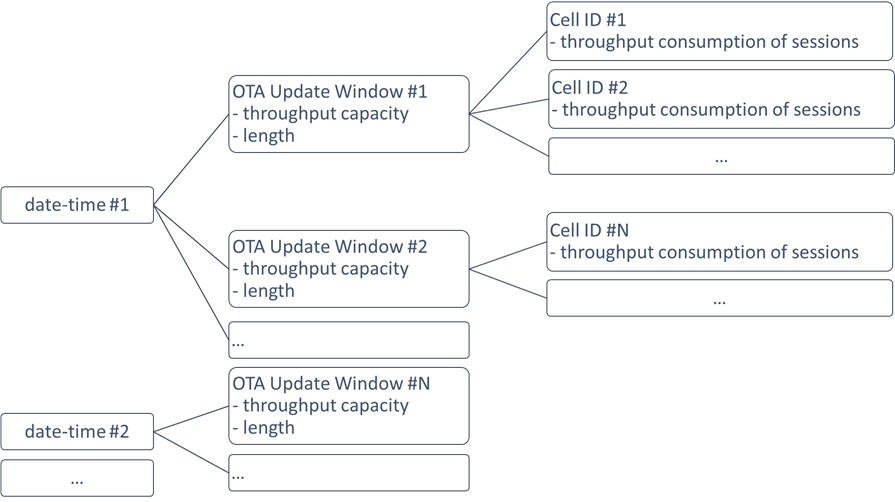
Figure 6: Example for OTA Update Window Monitor
2. Subscribing for notifications of the reachable state of the devices
This is an optional step executed only if the IoT devices may not be reachable during the periods of the OTA Update Windows. The IoT OTA Update server subscribes to the reachable state of the devices using the ‘Procedures for Reporting of Network Status’ of the T8 API – see the latest 3GPP TS 29.122 for more details. The Service Capability Exposure Function (SCEF) sends a Monitoring Event Notification to the IoT OTA Update server when the IoT device gets reachable.
Orchestration of FW update sessions
The OTA Update Window Monitor is activated before the beginning of the OTA Update Campaign. It triggers the orchestration function whenever the start time of the OTA Update Windows takes place.
Using the OTA Update Window Monitor and the Device Map, the orchestration method launches new OTA Update control processes of the devices which
- reside in the monitored cell
- have not updated with the new FW yet
- have such a FW update session of which
- length fits into the remaining time of the OTA Update Window
- throughput consumption fits into the remaining throughput capacity of the OTA Update Window
An example for the alignment of sessions within an OTA Update Window is shown in Figure 7. The OTA Update Window cannot be utilized a hundred percent by the sessions. It is particularly valid for devices not permanently reachable during the OTA Update Windows.
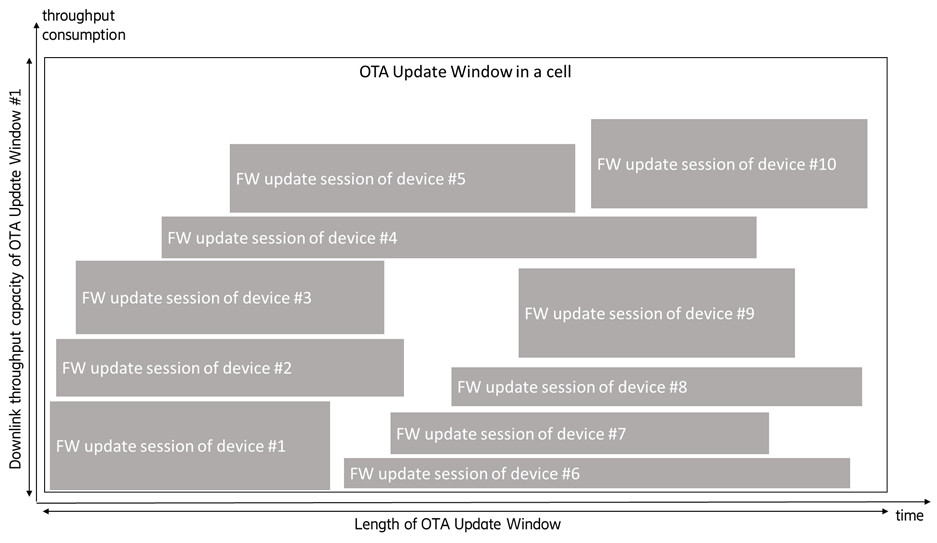
Figure 7: Example for alignment of sessions within an OTA Update Window in the view of time and throughput consumption
The OTA Update control processes are assumed to notify the orchestration function when their FW download has finished. Thereby the orchestration can track the remaining throughput capacity of the cells in the OTA Update Window Monitor.
The orchestration method has the variants below according to the mode how the FW update session starts.
1. The IoT devices are permanently reachable during the OTA Update Windows
Using the OTA Update Window Monitor, the method iterates through the actual OTA Update Windows and their correlated cells. Using the Device Map, the method triggers the appropriate OTA Update control processes.
2. The IoT devices may not be reachable during the OTA Update Windows
The IoT OTA Update server has subscribed for device reachability notifications in the preparation phase. When the orchestration method receives a notification, it checks in the OTA Update Window Monitor if the corresponding session can be started.
Network level aspects of the OTA Update Campaign
The orchestration shall check on the server side if the aggregated traffic exceeds the capacity of the IoT OTA Update server, the file server and the interconnecting IP network.
The orchestration method calculates the aggregated throughput consumption and the number of parallel sessions. It is recommended to check the following conditions.
- The aggregated throughput consumption must not exceed the capacity of the file server and the IP network which connects the file server to the cellular network otherwise the calculated lengths of the FW update sessions get invalid.
- The number of parallel sessions determines how many parallel OTA Update control processes shall be hosted by the IoT OTA Update server. It may define a special need for many client sockets. The client sockets need unique port numbers which is a limited resource in the server. There may be a demand for several IP addresses on the server side in this case.
Finally, there is an aspect not mentioned yet. The FW update sessions consume significant power which may be critical for the battery-operated devices. If a battery-operated device dwells in bad coverage, then the FW update may drain the battery. The manual FW update shall be considered by such devices.
Key learnings and our recommendations
The FW update traffic may easily challenge the downlink throughput capacity or the maximum number or parallel sessions in the cells of the NB-IoT networks. Therefore, the orchestration of the FW update sessions must consider the cell location and the coverage conditions of the devices as well as the available resources in the cells.
The orchestration shall also consider the server-side impact of the FW update traffic. The high number of parallel control processes may challenge the capacity of the IoT OTA Update server – computing, memory, networking and optional socket port demands shall be considered. The file server and the internet connection to the cellular network must have enough capacity not to restrict the speed of the FW download.
In sum, the FW update sessions shall be monitored and controlled at both cell and network levels. Its successful execution requires close cooperation between the enterprise customer and the CSP.
Finally, we shall consider the impact of the coverage conditions. Special treatment may be needed for the devices residing in bad coverage.
Learn more
Massive IoT in the city – Mobility Report - Ericsson
The Internet of Things (IoT) technology - Ericsson